Exaro Model
Subscribe to Exaro Studio + Model, install Exaro Model with the Exaro Installer, and build in Blender from the sidebar, from your AI or from the command line.
Works with your Claude Code or Codex subscription. Don't have one? Install Claude Code or Codex.
What you get
Two parts work together, and Exaro Studio installs both for you:
- The Exaro Model engine (
exaro-blender.exe), a signed Windows program. It runs the building, rigging, animation, export and Unreal handoff, the connection for your AI, and the licence check. - The Exaro add-on for Blender (5.0 or newer), which puts an Exaro tab in the 3D Viewport sidebar and does the work inside your open scene. The add-on is open source under the GPL.
Exaro Model comes with Exaro Studio + Model, $99.99 a month or $899.99 a year, which also includes Exaro for Unreal, Exaro for Godot, Exaro Drawing and Exaro Sound. On Exaro Studio already? Add Exaro Model from your account page. Without a licence only the viewport preview works. It does best today on vehicles, machinery and mechanisms with working parts, rigged and animated for Unreal, Unity, Godot or GLB. As the EULA says, we keep build data from Exaro Model to improve the product. Building with kits, model checks and fixes, and recipes run on our Build Service (build.exarostudio.com), so they need an internet connection while you build.
What's in Exaro Model
- Guided building. Your own AI (Claude, Codex, Cursor or a local model, over MCP) builds models in Blender from basic techniques, guided by Exaro's building guide and lessons.
- Live model checks and automatic fixes on the Exaro Build Service: floating parts, z-fighting, overlaps, clearance, ground contact, spelling and more.
- Construction kits for the parts that have to fit, join and move, ordered by your AI by name and built on the Build Service, with their animation clips and a rigged game export (GLB/FBX for Unreal, Unity and Godot). Your AI lists the kits your plan includes from inside Blender.
- Reference guidance: real-world size ranges, usual parts and construction notes for common objects, so your AI designs its own.
- Humanoid rigging and animation of a character mesh you already have (T-pose or A-pose; separate clothing pieces follow the body), with game export.
- Critic, review and compare tools. Your AI uses them to critique a build, review it and compare versions.
Coming next: more construction kits, released to subscribers as they pass testing.
Requirements
- Windows 10 or 11, 64-bit.
- Blender 5.0 or newer (Windows x64). Tested on Blender 5.0, 5.1 and 5.2, and on the 5.3 and 5.4 test builds. Blender 4.x, including 4.5 LTS, is not supported. No Blender yet? Exaro Studio can install Blender 5.2 for you, or get it from blender.org/download (the installer or the portable zip, Steam or the Microsoft Store all work; Exaro Studio finds a portable Blender in your Downloads, Desktop or Documents folder or at the top of a drive, and anywhere else you pick it with Browse). A Blender newer than that is used too; if something fails in it, Exaro says so and suggests Blender 5.2.
- For the Exaro chat in Blender: Claude Code (needs a Claude Pro, Max, Ultra, Team or Enterprise plan) or Codex (works with any ChatGPT plan, including Free). See Set up the chat's AI.
- For Unreal: Unreal Engine 5.5 to 5.8. Send to Unreal also needs Exaro for Unreal in the editor, which comes with Exaro Studio + Model.
- An internet connection to activate your key, and while you build.
1. Get a key and download
Using Exaro Studio? Go straight to Install below: it finds your Blender, or installs one for you.Installing by hand: you need Windows 10 or 11 (64-bit), Blender 5.0 or newer, and Microsoft's Visual C++ runtime. Most PCs already have the runtime; if yours doesn't, get it free from Microsoft. Without it Blender can't install add-ons.
- Subscribe to Exaro Studio + Model (monthly or yearly). Your key appears on your account page as soon as you have paid.
- Sign in at app.exarostudio.com/account. The Exaro Model section shows your licence key and the download.
- Click Download for Blender. You get a small add-on zip (
exaro_studio_blender-<version>.zip). Keep the zip to yourself: it carries your account's download link.
2. Install
With Exaro Studio, connect your account and click Install next to Exaro Model. It finds the newest Blender 5.0 or newer on your PC (installed anywhere, Steam and the Microsoft Store included, or a portable copy in Downloads, Desktop, Documents or at the top of a drive), adds the add-on to it, downloads the engine and activates it, with no key to paste and nothing to do inside Blender.
No Blender? Exaro Studio offers Install Blender for me: it downloads Blender 5.2 from blender.org (about 400 MB), checks it against Blender's published checksum, installs it for your Windows user with no administrator prompt, adds it to the Start menu and desktop, and then carries straight on with Exaro Model. You can instead click I have Blender: Browse to pick your blender.exe, or Download from blender.org, install it yourself and click Check again. A Blender that Exaro Studio installed is listed in Windows under Settings › Apps as Blender 5.2 (installed by Exaro Studio); removing it there removes only that copy.
When the row says activated, click Open and go to Three ways to work.
To install the zip by hand instead:
- Install Blender 5.0 or newer from blender.org/download first, if you haven't already.
- Install Microsoft's Visual C++ Redistributable (x64) from aka.ms/vs/17/release/vc_redist.x64.exe if this PC doesn't have it (most do). Blender needs it to install add-ons. It's signed by Microsoft and takes a few seconds.
- Drag the zip into the Blender window and confirm, or use Edit → Preferences → Get Extensions → Install from Disk and pick the zip.
- In the 3D Viewport press N. The sidebar opens on Blender's Item tab, so click the vertical Exaro tab at its right edge (1), then Install the Exaro engine (2). It downloads the signed engine (about 300 MB) once, with a progress bar. If Blender asks, allow online access (Edit → Preferences → System → Network).
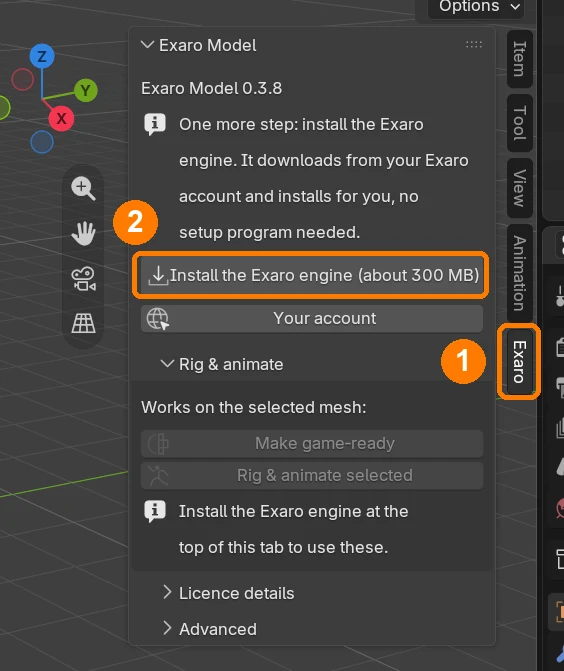
No administrator rights are needed, and Windows never asks you to run anything. The engine lives in your own profile at %LOCALAPPDATA%\ExaroStudio\Blender\engine\, and the same button updates it when a new version is out.
3. Activate your key
Exaro Studio does this for you. You only need this step after installing the zip by hand. Your key is in your account. Individual keys start with EXAROBLENDER, Studio keys with EXAROBSTU. The first activation needs an internet connection.
In Blender
- In the 3D Viewport press N to open the sidebar, then click the Exaro tab.
- In the Welcome panel, paste your key and click Activate.
- The panel shows your licence status. When it says Licensed, everything is unlocked.
From a terminal
The engine is not added to your PATH, so call it by its full path:
"C:\Users\<you>\AppData\Local\ExaroStudio\Blender\engine\exaro-blender.exe" licence activate EXAROBLENDER-XXXXX-XXXXX-XXXXX-XXXXX
"C:\Users\<you>\AppData\Local\ExaroStudio\Blender\engine\exaro-blender.exe" licence status
The rest of this page writes exaro-blender for short.
4. Three ways to work
a. In the Blender sidebar
Press N in the 3D Viewport and open the Exaro tab:
- Welcome: your licence status, key entry, how to connect your AI, and a link to this guide.
- Rig & Animate:
- Make Game-Ready turns a dense mesh (a scan or a generated model) into a clean, game-ready copy. The original is hidden, not deleted.
- Rig & Animate Selected rigs the selected humanoid mesh, skins it and bakes its animation clips. Choose a Name, a Height, and where to Export it: Unreal, Unity, Godot, Generic or None. Creature rigging is not in this release.
- Advanced: the connection your AI and the engine use to reach Blender, shown as the bridge, with Start/Stop and its port.
Rigging works best on a model standing in an A-pose or T-pose with its arms clear of the body and its feet on the ground. If a model can't be rigged, the message says why.
Set up the chat's AI
The Exaro chat in Blender (Open Exaro chat in the Exaro tab) answers with an AI app you already have, signed in with your own account. Exaro adds no AI fees.
- Claude Code. Needs a Claude Pro, Max, Ultra, Team or Enterprise plan. Claude Code setup.
- Codex. Works with any ChatGPT plan, including Free: Free, Go, Plus, Pro, Business, Edu or Enterprise. Codex CLI.
No Claude Code or Codex yet? In Exaro Studio, click Set up on the Your AI card, then Install for me. In Blender, Choose your AI also has an Install button for each, opening its official page.
To sign in, click Sign in to Claude or Sign in to ChatGPT (Codex) under Choose your AI. The sign-in page opens in your browser; sign in there. If the page shows a code, copy it and click Paste code. The card turns Ready by itself. No terminal needed.
Advanced: an API key instead of a plan. Both apps can also run on a pay-as-you-go API key, billed by Anthropic or OpenAI. For Claude Code, set ANTHROPIC_API_KEY as a Windows user environment variable, then restart Blender. Codex doesn't read an environment variable: store the key once with codex login --with-api-key (it reads the key from what you paste or pipe in, for example $env:OPENAI_API_KEY | codex login --with-api-key in PowerShell). A plan is the simpler choice for most people.
b. With your AI over MCP
Works with your Claude Code or Codex subscription. Don't have one? Install Claude Code or Codex.
Exaro Model includes an MCP server, so Claude, Codex, Cursor or any MCP app can build, rig, inspect and export in your Blender. Open Blender with the Exaro add-on enabled first: the server connects to that Blender and does not start one itself. The server runs over stdio with this command:
"C:\Users\<you>\AppData\Local\ExaroStudio\Blender\engine\exaro-blender.exe" mcpThe quickest way to set it up: in Blender, open the Exaro tab and click Connect your AI, then pick your app. It copies the exact setup for this computer, which you paste into a terminal (Claude Code) or into the app's settings file. The same entries, written out:
Claude Code
claude mcp add exaro-model -- "C:\Users\<you>\AppData\Local\ExaroStudio\Blender\engine\exaro-blender.exe" mcpClaude Desktop
Open Settings → Developer → Edit Config to edit claude_desktop_config.json, add this, then restart Claude Desktop:
{
  "mcpServers": {
    "exaro-model": {
      "command": "C:\\Users\\<you>\\AppData\\Local\\ExaroStudio\\Blender\\engine\\exaro-blender.exe",
      "args": ["mcp"]
    }
  }
}
Codex CLI
Add this to ~/.codex/config.toml:
[mcp_servers.exaro-model]
command = 'C:\Users\<you>\AppData\Local\ExaroStudio\Blender\engine\exaro-blender.exe'
args = ["mcp"]
Cursor
Put the same block as Claude Desktop in .cursor/mcp.json:
{
  "mcpServers": {
    "exaro-model": {
      "command": "C:\\Users\\<you>\\AppData\\Local\\ExaroStudio\\Blender\\engine\\exaro-blender.exe",
      "args": ["mcp"]
    }
  }
}
Any other MCP app that can start a local command works the same way: the command is exaro-blender.exe with the argument mcp. Then just ask, for example: “Rig the selected mesh as a biped called Scout, 1.7 m tall, for Unreal.” A good assistant looks at every render the tools send back; if yours reports success without describing them, ask it to check.
c. Headless from the command line
The engine's commands start a background Blender by themselves when they need one, so you can script them without opening Blender. Add --help to any command for its options.
| Command | What it does |
|---|---|
licence status | activate KEY | refresh | deactivate | Check, activate, refresh or release your licence on this machine. |
setup-report | Lists the Blender and Unreal installs it found and where your files are stored. |
install-extension | Installs the add-on into every Blender 5.0 or newer it finds. |
rig-mesh | Rig and animate a humanoid character mesh. |
export-game --engine unreal|unity|godot|generic | Game-ready export for your engine. |
send-to-unreal | Send a character into your open Unreal Editor. |
retarget-unreal | Retarget Unreal motion capture onto your character. |
version | The installed version. |
exaro-blender version
exaro-blender setup-report
exaro-blender rig-mesh --help
exaro-blender export-game --engine unity --help
5. Teach it your standards
Exaro Model starts with what we have learned building our own assets: dozens of lessons on joinery, hardware, materials, wear and mechanisms, which your AI reads before it plans. You can add your own on top, in plain words, while you work:
- “Remember: …” For example “remember: our wood bevels are 2 mm” or “remember: no text on props”. Your AI saves it and follows it in every build after, before our lessons.
- “What are my standards?” lists them; “forget the bevel one” removes one.
- When an update improves something you had changed, your AI tells you what changed and asks whether to try the new way. Your standard stays until you say so.
Your standards are yours: they stay on your computer, in one readable file in your Exaro Model data folder, and updates never change them. A team on a Studio license can share one set: ask your AI to remember a standard “for the team”, with every seat pointed at the same shared folder (the EXARO_STANDARDS_SHARED environment variable).
6. Send to Unreal and Unity
Unreal
Open your project in Unreal Editor (5.5 to 5.8) with the Exaro for Unreal plugin enabled. Then ask your AI to send the character to your project, or run exaro-blender send-to-unreal. Exaro for Unreal is sold separately; see the Unreal plugin docs to install it. To get files instead, use export-game --engine unreal or the Unreal option of Rig & Animate Selected.
Unity
Export with Rig & Animate Selected (Unity), export-game --engine unity, or ask your AI to send the character to your Unity project. Sending writes it into the project as Assets/BlenderCharacters/<Name>/<Name>.fbx.
Godot and other engines: use export-game --engine godot or --engine generic.
7. Subscription, machines and updates
| Exaro Studio | |
|---|---|
| Price | $29 a month or $249 a year |
| People | 1 (teams and companies, talk to us) |
| Machines | 2 |
| Updates and Build Service | While subscribed |
- Moving to a new machine: run
exaro-blender licence deactivateon the old one, then activate on the new one. If the old machine is gone, release it from your account page. - Your licence: its term and seats are the ones agreed with your team. Your key and machines are on your account page.
- Building needs a connection: kits, model checks, fixes and recipes run on the Build Service and do not work offline. Local work keeps going offline; the licence refreshes itself when you are online, or run
exaro-blender licence refresh. - Updates: new versions are on your account page while your licence is active.
Troubleshooting
Start with exaro-blender setup-report: it shows which Blender and Unreal installs were found and where your files are.
Your AI app can't find the engine
Check the path in your MCP config. The engine is at %LOCALAPPDATA%\ExaroStudio\Blender\engine\exaro-blender.exe (older installer installs: C:\Program Files\Exaro Model\exaro-blender.exe) and is not on PATH, so use the full path. The Exaro tab shows the exact command for your machine. In JSON files every backslash is doubled. Restart the app after changing its config.
Your AI can't reach Blender
- Blender must be open with the Exaro add-on enabled. The AI connection never starts Blender for you.
- In the Exaro tab, open Advanced and check the bridge is running. Click Start if it isn't.
- If the add-on and the engine report different versions, click Update the Exaro engine in the Exaro tab, or download the add-on again from your account.
Port already in use
Blender listens on port 8811 on your own machine only. If another program has that port, usually a second copy of Blender, close it and click Start in Advanced. To use a different port, set the Windows environment variable BRIDGE_PORT (for example 8810) for both Blender and your AI app, then restart both.
“Package was expected to be installed but not found”
Blender couldn't unpack the add-on because this PC is missing Microsoft's Visual C++ runtime, which Blender's add-on installer needs. Install the Visual C++ Redistributable (x64), then drag the zip into Blender again.
No Exaro tab in Blender
- Press N in the 3D Viewport; the tab is in the sidebar.
- Check you are running Blender 5.0 or newer (Help → About). Blender 4.x is not supported.
- Check Edit → Preferences → Add-ons and enable the Exaro add-on.
- Installed a new Blender after Exaro Model? Click Install next to Exaro Model in Exaro Studio again, or drag the add-on zip from your account into that Blender.
Licence states
| Status | Meaning | What to do |
|---|---|---|
| Licensed | Everything is unlocked. | Nothing. |
| Licensed (offline) | Local work only; building needs the Build Service. | Connect to the internet to build. |
| Offline too long | The licence has not refreshed for too long. | Connect once; it refreshes by itself, or run licence refresh. |
| Unlicensed | No key activated on this machine. | Activate your key (step 3). |
| Revoked | The subscription ended, was refunded or charged back, or the seat was removed. | Resubscribe, or email support. |
| Not valid here | The key is for another product, or the licence was copied from another machine. | Activate your Exaro Model key on this machine. |
Too many machines: deactivate one you no longer use, or release it from your account page. Can't reach the licence server: check your internet connection, proxy or firewall, and that build.exarostudio.com is allowed too: building needs it.
Support
Email support@exarostudio.com with the output of exaro-blender setup-report, the version from exaro-blender version, and the exact error text you saw.